
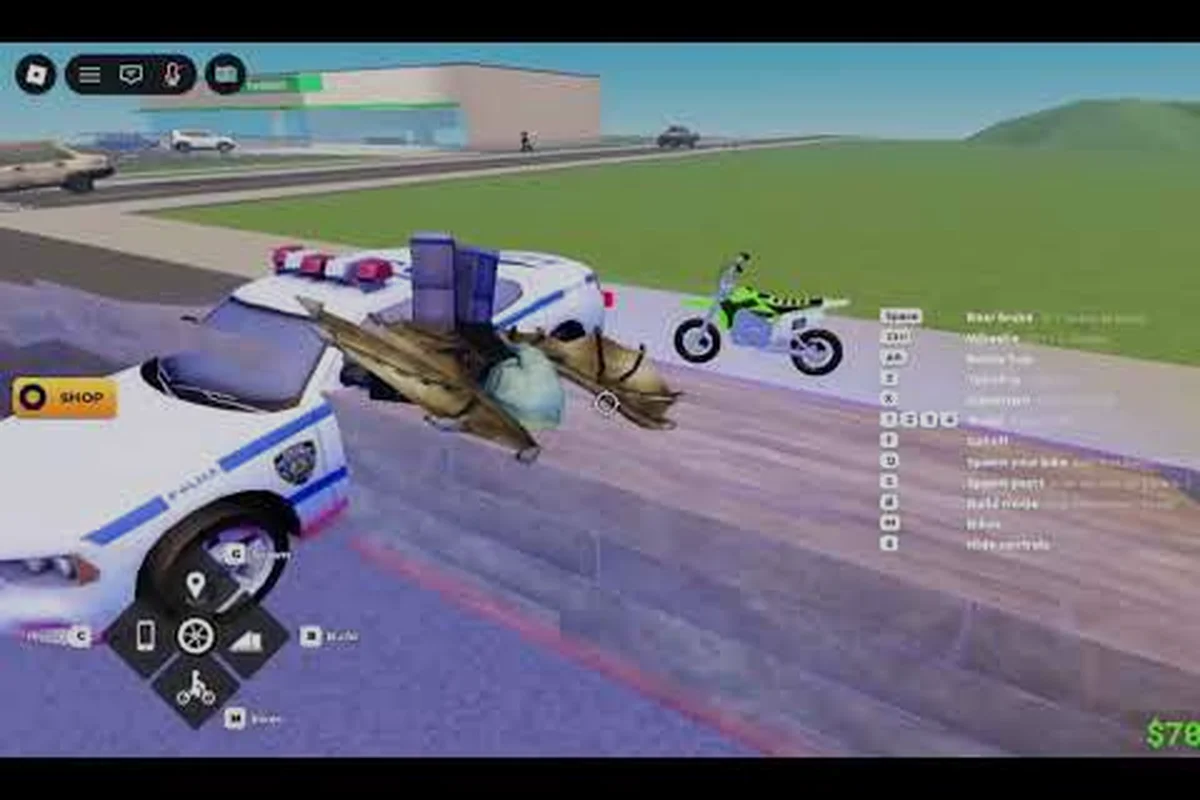
Jumping into the Bike Universe beginner guide route is the fastest way to skip the awkward first hour every new rider goes through. Bike Universe is a Roblox vehicle-simulation experience where you cruise an open-world map, collect bikes from the Dirt, Electric, and Pedal families, and earn cash from riding, wheelies, and tricks. The official game page reports 13.1M+ visits, 48.9K active players, and 38K+ favorites as of late September 2026, which means plenty of new players are running the same first session you are about to start.
This Bike Universe getting started walkthrough covers the controls you need on day one, the right first bike to grind, the early money loop, and the small mistakes that quietly bleed your cash before you ever buy a real upgrade. Treat it as your launch checklist.
What Bike Universe Actually Is (and What to Expect on Day One)
Bike Universe is a free-to-play Roblox experience built around three pillars: collecting bikes, pulling tricks, and racing. The game runs on Desktop, Console, Mobile, and Tablet, so the control scheme you learn depends on your device, but the core loop stays the same. You spawn with a free starter bike, ride around the open world, perform wheelies and tricks to earn cash, save up for a new family, and repeat. The deeper game opens up once you own multiple bike families, tune them, and start racing friends at custom tracks.
The developer group behind the experience is the Bike Universe Roblox group, run by owner FJJWolfie3 with about 64,969 members on the October 2026 snapshot. Joining that group is the most reliable way to catch official announcements, code drops, and patch notes, because Bike Universe does not have a separate Steam or Discord news feed.
Which Bike Families You Will Unlock First
Every bike in the game belongs to one of three families, and your first big decision is which family to grind toward. The families have very different feel, top speed, and price tier, so a smart Bike Universe beginner guide treats them as long-term goals rather than immediate purchases.
| Family | Best For | Riding Feel | Typical Price Tier |
|---|---|---|---|
| Dirt | Tricks, off-road ramps, rough terrain | Bouncy, high wheelie potential | Mid |
| Electric | Top speed, road cruising, long-distance cash | Smooth, quiet, fast on flat ground | High |
| Pedal | Beginner-friendly, low cost, stunt practice | Lightweight, easy to control | Low |
Picking a family too early is one of the most common Bike Universe tips for beginners mistakes. Most veterans recommend grinding at least one full money session on your starter before committing, because the riding feel changes a lot once you upgrade.
What You Get for Free vs. What Costs Robux
The game is free to play, and your starter bike is genuinely free, not a 24-hour trial. Cosmetics, some premium bike skins, and certain shortcut boosts are sold for Robux, but the entire bike collection, all upgrade parts, and every track are unlockable through gameplay cash. That matters for a Bike Universe how to play plan, because you never need to spend Robux to enjoy the full game.
Controls and Movement: Getting Comfortable Before You Spend
Before worrying about which bike to buy, you need to feel comfortable actually riding. Bike Universe controls look simple on paper — a single stick for steering, a trigger for throttle, and a face button for tricks — but they have a few quirks that punish sloppy inputs, especially on mobile and controller. On touchscreens, your finger placement on the tilt zone matters more than the visual ring suggests: a thumb anchored near the edge gives noticeably tighter response than a centered hold, which is why most first-time riders overshoot corners until they relax their grip. Stick users, meanwhile, have to remember that the trigger throttle is analog, not binary — tapping it like a button in Bike Universe will lurch the bike and break your line for the next jump, so commit to a smooth pull before you even approach the ramp.
Core Controls by Platform
The control layout is mostly identical across devices, but the input method changes how forgiving each action feels. On keyboard you have the most precision for wheelies and stoppies, on controller the throttle and brake feel most natural, and on mobile you rely heavily on on-screen buttons which can crowd the UI.
| Action | Keyboard | Controller | Mobile |
|---|---|---|---|
| Accelerate | W / Up Arrow | Right Trigger | On-screen throttle |
| Brake / Reverse | S / Down Arrow | Left Trigger | On-screen brake |
| Steer | A / D or Left / Right arrows | Left Stick | On-screen tilt or buttons |
| Wheelie | Hold W + tap S rhythm | Right Trigger + Left Trigger tap | Throttle + brake tap |
| Stoppie | Hold S + tap W rhythm | Left Trigger + Right Trigger tap | Brake + throttle tap |
| Camera | Right Mouse Button drag | Right Stick | Swipe |
| Reset Bike | R | Y / Triangle | Reset button |
The rhythm-based wheelie input is the single most important Bike Universe tip for beginners you can learn. It is not a hold, it is a pulse: throttle forward, then quickly tap brake, and let the bike's momentum do the rest. If you hold both at once you just stall, which is the most common reason new players think wheelies are broken.
The First 10 Minutes Checklist
These four basics take roughly 10 minutes total and form the load-bearing layer of every Bike Universe beginner guide: wheelie control, jump landing timing, stoppie brake-tapping, and map navigation. Skipping them is the single most expensive Bike Universe tips for beginners mistake you can make, because high-value cash methods like BMX combo runs, roof stunt chains, and the downtown glitch grind all assume you already have clean balance physics and reliable spawn-to-trick-spot routing. Treat the 10 minutes as a prerequisite, not a warm-up.
-
Find a flat stretch of road away from the spawn area and practice the wheelie pulse until you can hold one for at least 5 seconds
-
Drive into a low ramp and pop a small jump so you understand how the bike lands
-
Pull off the road and try a stoppie so you know the brake-tap rhythm
-
Open the map, mark a trick hotspot, and ride there without worrying about cash yet
If you can do all four, you are already past the stage where most players give up. The full trick list lives in the dedicated Bike Universe tricks guide, but the basics above are enough to start earning real cash.
Picking Your First Bike and What to Save For
Your starter bike is intentionally weak, so the goal of your first session is to grind enough cash to leave it behind. The right Bike Universe for beginners path is not to buy the most expensive bike on day one, it is to buy the family that matches how you actually like to ride.
Starter Bike vs. First Upgrade
The free starter bike has lower top speed, lower trick payout, and a smaller cash multiplier than any bike you can buy. That is by design, because the game wants your first cash milestone to feel rewarding. The first meaningful upgrade usually costs somewhere in the 5K-15K cash range depending on the family, and a single focused money session can easily reach that.
| Bike Tier | Approx. Cash Cost | Speed vs. Starter | Trick Payout Multiplier |
|---|---|---|---|
| Starter (free) | 0 | 1.0x baseline | 1.0x |
| First family bike | ~5K-15K | 1.2-1.4x | 1.1-1.3x |
| Mid-tier tuned | ~50K-150K | 1.6-1.9x | 1.4-1.7x |
| Endgame top-spec | 500K+ | 2.0x+ | 2.0x+ |
These numbers are community-reported ranges as of the October 2026 patch and shift with each update, so always confirm in-game before committing your full bank. The exact pricing and stat gaps are covered in the broader Bike Universe tune bike guide for players who want to optimize part by part.
Which Family to Buy First
Every beginner asks "what is the best first bike in Bike Universe?" but the real answer depends on your grind loop: Wheelie trick chains favor Dirt's torque curve, long highway Passive income runs favor Electric's flat-road speed, and tight-budget experimenters should grab a cheap used Pedal before committing cash to either specialty family.
-
Pick Dirt if you love ramps, off-road shortcuts, and pulling long wheelies for cash
-
Pick Electric if you prefer cruising long flat roads, racking up distance-based passive income, and racing
-
Pick Pedal if you are still learning the controls and want the cheapest possible second bike to experiment on
Players who like to race tend to regret buying a Pedal first because the low top speed hurts them in 1v1 events, while players who love tricks regret buying Electric first because the heavier feel makes wheelies harder. There is a deeper breakdown of the family tradeoffs in the Bike Universe how to race guide for riders leaning toward competitive play.
How to Earn Cash Fast in the First Hour
Cash is the only progression currency in Bike Universe, so the quality of your Bike Universe getting started plan lives or dies on how fast you stack it. There are three reliable income streams, and you should learn all three because each scales differently as you upgrade.
The Three Ways Bike Universe Pays You
Riding income is the most passive, trick income is the highest burst, and event income is the most situational, and a solid Bike Universe beginner guide treats these as a rotation rather than a single grind. The key is reading your Cash Rate (approx.) column at a glance: when your passive ticking from cruising slows below the tuned Dirt bike's burst window, swap to a wheelie session at a stadium; when an event lobby opens during peak hours and your family bike's handling stat clears the race gate, pivot to racing for the highest per-minute return before returning to grinding distance. This rotation mindset is what separates a real Bike Universe getting started plan from just AFK-ing in the Electric family.
| Income Stream | How It Works | Best For | Cash Rate (approx.) |
|---|---|---|---|
| Distance riding | Cruise anywhere, passive tick per meter | Long sessions, Electric family | Low but constant |
| Wheelies & tricks | Hold a wheelie, land clean tricks | Short focused bursts, Dirt family | High burst |
| Races & events | Win races, finish objectives | Mid-game, all families | Highest per minute |
Distance riding is the safest Bike Universe tip for beginners because it requires no skill, just time. Wheelies and tricks scale much harder once you own a tuned bike, and races only become worth it once you have a competitive family bike. Community data on a Reddit r/Roonby guide suggests steady riding income plus targeted wheelie sessions is the best early-game combo, though the exact numbers vary by patch.
The First-Hour Money Loop
For the first 60 minutes of your Bike Universe beginner run, the most efficient grind is the short, focused, repetitive wheelie loop covered in the steps below — stick to it until you bank enough to buy your first family bike (usually the BMX, around the $1,200 mark), then reassess your setup and unlock wheelies. The reason this loop dominates the Bike Universe getting started phase is that distance income multiplies trick income on flat terrain, so chaining wheelies down a single straight road produces roughly 2–3× the cash per minute of casual exploration before any upgrades land.
-
Find a long, straight, flat road with light traffic
-
Cruise one direction holding a wheelie for as long as possible
-
At the end of the road, turn around, repeat in the opposite direction
-
Cash out at any bank drop-off whenever your wheelie chain breaks
-
Bank in smaller chunks rather than riding with a full wallet, because some patches include a cash cap on un-banked money
The "wheelie loop" is the single most popular Bike Universe tips for beginners strategy in the community, and it works because it stacks distance income on top of trick income. If you want a deeper passive vs. active breakdown, the Bike Universe money making tips guide covers bank mechanics, money caps, and late-game passive setups in detail.
Beginner Mistakes That Bleed Cash
These are the small habits that quietly drain the wallets of new Bike Universe riders — things like burning Robux on cosmetics before buying a second bike, riding into high-traffic city zones where crashes reset your wheelie combo, or letting the bank overflow until a wipe deletes unbanked cash. Each one feels minor in the moment, but stacked together they can wipe out a full day's grinding in under an hour, and they are easy to fix once you understand the underlying economy loop behind wheelie rhythm, bank timing, and bike family synergy.
-
Spending your entire wallet on cosmetics before owning a second bike
-
Riding into high-traffic city zones where crashes reset your wheelie
-
Ignoring the bank until you are at full wallet, then losing cash on a reset
-
Buying the most expensive bike first instead of the family that fits your style
-
Skipping the wheelie rhythm practice and just holding both pedals, which pays almost nothing
The cosmetic trap is the most common Bike Universe for beginners mistake because the Robux shop sits right next to the bike shop, and shiny paint jobs look more exciting than a slightly faster engine. Save cosmetics until you have at least two family bikes and one full set of performance parts, because a tuned mid-tier bike always beats an untuned premium bike.
Building Your First Real Setup: Upgrades, Tuning, and Racing
Once you own your first family bike and have a few thousand in the bank, the game shifts from "learn the loop" to "build a setup." This is where Bike Universe how to play becomes a long-term progression path instead of a one-off tutorial.
Upgrade Priority Order
There is no need to max every part immediately, because a focused Bike Universe beginner guide upgrades parts in a specific order rather than spending cash evenly across the build sheet. Some components deliver far more value per dollar than others, and the table below ranks each by how much it actually shifts top speed, acceleration, wheelie length, or stoppie control on the test track. A Stage-2 engine swap, for example, can add roughly 12-15 mph of top end for the price of a full cosmetic respray that changes nothing in the physics engine. Following this Bike Universe getting started priority list keeps your tuning budget pointed at real performance gains instead of inventory clutter.
| Priority | Part Type | Why Upgrade First |
|---|---|---|
| 1 | Engine | Biggest top-speed jump per dollar |
| 2 | Wheels / Tires | Better grip, longer wheelie holds |
| 3 | Brakes | Cleaner stoppies, fewer crash resets |
| 4 | Frame | Weight and handling balance |
| 5 | Paint / Cosmetics | Looks great, zero performance gain |
Engine first, cosmetics last is the single best Bike Universe tips for beginners rule for upgrades. A tuned mid-tier bike will outperform a stock premium bike on every metric that matters, which is why the Bike Universe tune bike guide focuses heavily on part-by-part value rather than raw price tags.
When to Start Racing
Racing is the highest cash-per-minute activity in the game, but it is also the most punishing for under-geared riders. The community consensus is to wait until you have at least one full performance upgrade on your chosen family bike before entering your first 1v1. Once you are geared, the Bike Universe how to race guide covers race modes, custom tracks, and the friend-versus-friend setup that most new players do not realize is available from day one.
A final Bike Universe tips for beginners note: check the developer group page regularly for free code drops and weekend events, because those often double your cash rate for limited windows and are the fastest way to skip the early grind.
Frequently Asked Questions
How do I start playing Bike Universe as a complete beginner?
Search "Bike Universe" on Roblox, join a server, and you will spawn on a free starter bike. Spend your first 10 minutes learning the wheelie pulse on a flat road, then grind the wheelie loop until you can afford your first family bike (Dirt, Electric, or Pedal).
Which bike should I buy first in Bike Universe?
There is no single best answer, but the safest Bike Universe beginner guide pick is whichever family matches how you like to ride. Pick Dirt for tricks, Electric for cruising and racing, or Pedal for the cheapest possible second bike while you are still learning controls.
What is the fastest way to earn cash in Bike Universe?
The fastest early-game method is the wheelie loop: cruise a long straight road holding wheelies in alternating directions, bank regularly to avoid the un-banked cash cap, and stack distance income on top of trick income. Once you have a tuned bike, races deliver the highest cash-per-minute rate.
Do I need to spend Robux to enjoy Bike Universe?
No. Every bike family, every upgrade part, and every track is unlockable through gameplay cash. Robux is only used for optional cosmetics and certain shortcut boosts, so a free-to-play player can reach the full endgame without spending anything.
Is Bike Universe cross-platform?
Yes. According to the official game page, Bike Universe supports Desktop, Console, Mobile, and Tablet, and you can race and play with friends across all four platforms on the same servers. In practice this means a console player can invite a mobile friend to the same server without needing to switch hardware, and shared progression such as wheelie distance and cash rolls over to whichever device you log in on next, which is helpful for the Bike Universe beginner guide audience that may only own a phone or tablet.