
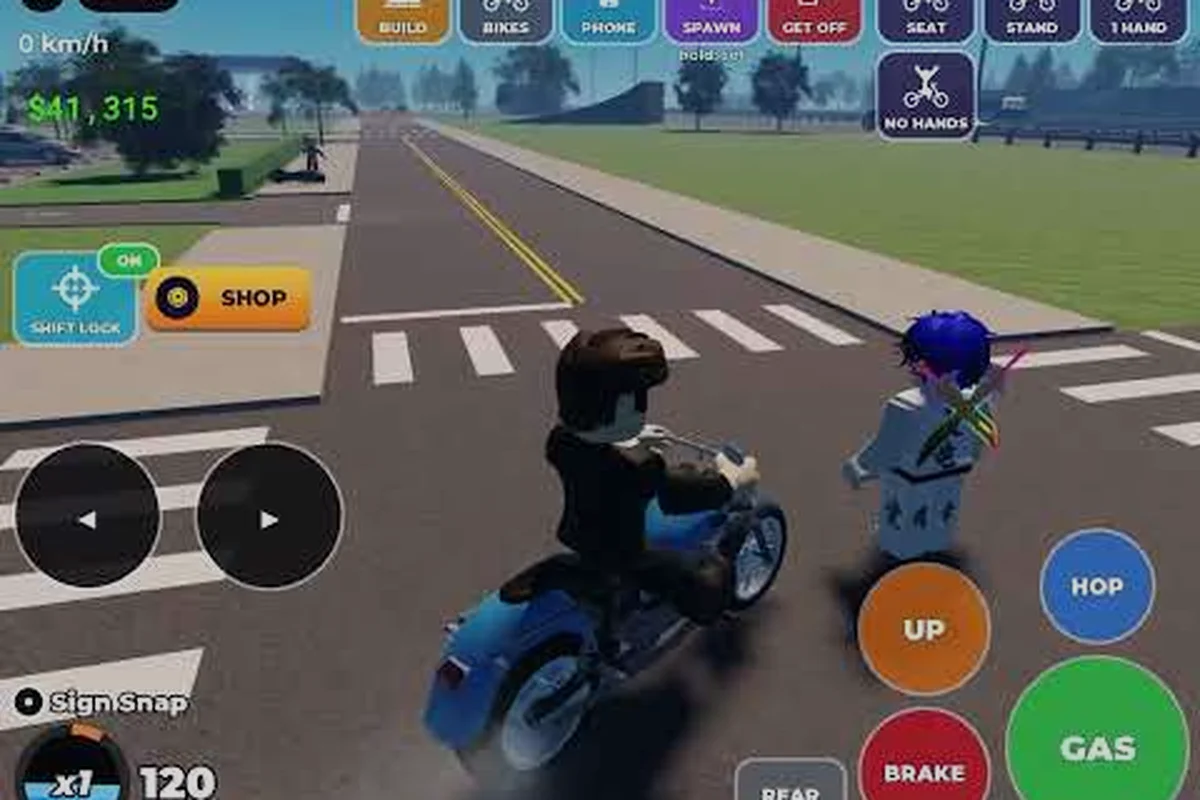
Bike Universe multiplayer is where the Roblox vehicle sim earns its name, because every map, race, and trick line fills up the moment other riders spawn in. With the official game page reporting around 48.9K active players and 13.1M+ visits on a late-September 2026 snapshot, finding a busy world is rarely a problem, but finding the right world takes a little know-how. This guide covers how server population works, how to pull friends into the same lobby, which servers tend to be the most active, and how to read the live numbers so you never queue into a ghost town.
How Bike Universe Multiplayer Servers Actually Work
Bike Universe runs on Roblox's standard server model, which means a single instance tops out at a fixed player cap and the matchmaking screen filters lobbies by population, region, and ping. According to the Bike Universe Roblox game page, the same lobby can welcome riders joining from desktop computers, consoles, mobile phones, and tablets alike, so the server pool stays shared across every platform. That cross-platform population pool is one reason the active-player count stays high even during off-peak hours.
Server Types and What They Mean
Roblox serves Bike Universe in two broad flavors: public servers that anyone can join and private servers that a player rents for a friend group. Public instances use Roblox's default matchmaking and can balloon past 20 riders during peak evening hours, which is why the population meter on the title screen spikes after school lets out. Private instances cap out smaller and stay friend-only, making them the go-to choice for coordinated bike universe multiplayer sessions like 1v1 races, clip-recording runs, or crew trick contests where randoms crashing your line would ruin the take.
| Server Type | Player Cap | Best Use Case | Cost |
|---|---|---|---|
| Public server | 20+ riders (Roblox default) | Casual cruising, racing randoms, population grinding | Free |
| Private server | Smaller, friend-only | Crew trick sessions, 1v1 races, recording clips | Robux monthly fee |
| VIP server | Up to 50+ riders via Roblox hosting | Large community events, creator showcases | Robux monthly fee |
| Studio test build | Variable | Developer or creator preview only | N/A |
Public servers are where 95% of multiplayer happens because the matchmaking screen is the default path. Private and VIP servers are useful when you want a controlled environment, but they do not show up in the public server browser, so they will not affect your in-game population count.
Why Server Choice Matters in Bike Universe
The server you queue into changes more than just who you see. Population density influences event spawns, race matchmaking, and even the cash pacing because crowded lobbies tend to be filled with players who are also grinding wheelies and tricks. A server with one other rider feels lonely and quiet, while a server at cap feels like a different game entirely.
Server density at a glance (community-reported averages):
| Density | Active Riders | What to Expect |
|---|---|---|
| Empty | 1-3 | Solo grind, no race opponents, low event chance |
| Light | 4-8 | A few riders around, decent for practicing tricks |
| Medium | 9-15 | Good race population, active trick spots |
| Full | 16-20+ | Loud, busy, frequent race challenges, max event spawns |
Most experienced players aim for a Medium to Full density because that is where the bike universe multiplayer experience feels alive without becoming chaotic. In the 9-15 rider Medium band, race matchmaking fills lobbies within seconds, event spawns trigger roughly every 4-6 minutes, and trick spots like the pier and industrial zone stay active with spectators who will challenge you mid-combo. Push past 16 riders and cash pacing inflates sharply since the server-wide multiplier scales with concurrent grinders, but wheelie chains get interrupted constantly by passing traffic. The sweet spot for a long session is usually 12-14 concurrent players, enough population to chain bike universe friends into spontaneous crew races while still leaving breathing room for clean trick lines.
Reading Bike Universe Population and Popularity Stats
Live numbers matter in any multiplayer game, and Bike Universe is no exception. The Bike Universe Roblox game page is the single most reliable place to check current population because Roblox updates the player count in near real-time. The October 2026 snapshot recorded about 48.9K active players, 13.1M+ total visits, and 38K+ favorites, which is a strong signal of a healthy, active community.
Bike Universe Stats That Actually Matter
Raw numbers on a server browser page can be noisy, so a friend looking to join a populated Bike Universe multiplayer session should focus on three signals that each tell a different part of the story: active players reflect the in-the-moment population of a server, favorites (~38K+ as of late September 2026) reveal how many riders have bookmarked the game for repeat sessions, and total visits (now above 13.1M) demonstrate long-term popularity that keeps Bike Universe servers alive between major updates.
| Stat | What It Tells You | Late-Sep 2026 Reading |
|---|---|---|
| Active players | How many people are in-game right now | ~48.9K |
| Total visits | Long-term popularity over the game's lifetime | 13.1M+ |
| Favorites | How many players bookmarked the game | 38K+ |
| Upvotes / Likes | General sentiment from the player base | High (per page) |
| Group members | Community size on the official Roblox group | ~64,969 |
Active players is the most immediate indicator of whether you will find a populated server. Total visits and favorites measure long-term popularity, which is helpful for judging whether the game will still be active months from now. Group members, reported on the Bike Universe Roblox group, give a sense of how invested the community is, since group members tend to be the players who return for updates and events.
When Population Peaks (and When It Dips)
Bike Universe multiplayer tends to follow a predictable weekly rhythm that mirrors school and work schedules in major regions. On a typical US weekday, the population curve climbs sharply after 3 PM as school dismissal hits, peaks in the 6-10 PM prime time band, and then tapers into the 10 PM-1 AM late night window — while EU riders effectively take over the early-morning lull with their own commuter sessions, giving the game a near-24-hour rotation of active servers for global bike universe friends.
| Time Window (US) | Expected Density | Notes |
|---|---|---|
| Weekday morning (7-10 AM) | Low-Medium | Mostly mobile and tablet riders |
| Weekday afternoon (3-6 PM) | Medium-High | School dismissal peak |
| Weekday evening (6-10 PM) | High | Prime time, races fill up fast |
| Weekday late night (10 PM-1 AM) | Medium | Older teen and adult crowd |
| Weekend morning (8 AM-12 PM) | Medium | Steady, family players |
| Weekend afternoon (12-6 PM) | High | All-platform peak |
| Weekend late night (12-4 AM) | Medium-High | Trick grinders and creators |
Patch drops and holiday banners can push the bike universe population curve well past its weekday ceiling — a single new bike family or limited-time seasonal event routinely inflates Full server queue times across regions, so coordinate with your bike universe friends before logging in if you want to skip the lobby bottleneck and land directly on a rideable server.
Playing with Friends: Invites and Server Entry
Playing with friends is the heart of Bike Universe multiplayer, and Roblox makes it easy once you know the right buttons. Because the Friend Invite button sits inside the in-game Players list rather than on the main HUD, most new players miss it the first time they boot up a server. The flow is similar on every platform, but the exact location of the friend invite button varies slightly: on PC you'll find the Players icon at the top-left of the screen, on mobile it lives behind the Roblox side-menu, and on Xbox/console you have to trigger it through the party overlay using a shoulder button, which is why many Bike Universe friends end up queuing in a private server instead of joining the same public lobby.
The Standard Invite Flow
Following the Standard Invite Flow in bike universe multiplayer is the fastest way to consolidate two players into one shared server. The full sequence takes roughly 15-20 seconds end-to-end, since the platform-level friends list on Roblox already knows which bike universe servers each player is currently riding in, eliminating the need to manually share join codes or copy server links. This makes it the go-to method for most bike universe friends who simply want to race, stunt, or cruise together without hunting for empty public servers.
-
Open the in-game friends list by pressing the friends icon in the top-right corner of the screen.
-
Pick the friend you want to ride with and select their name to open the profile popover.
-
Tap "Join" if your friend is already in a server. Roblox will swap you into their server automatically.
-
Tap "Invite to Join" if your friend is offline or in a different game. They will get a notification with a Join button.
-
Wait on the loading screen. Roblox migrates you into the friend-hosted server in about 5-15 seconds.
Because the friends list is baked into the platform-level Roblox client rather than bike universe itself, the Standard Invite Flow behaves identically on every supported device — Desktop, Console (Xbox/PlayStation), Mobile, and Tablet — without any extra authentication, button remapping, or controller binding. This cross-platform consistency is a major reason the title maintains its bike universe popularity, since a player queuing on mobile can pull a friend who is mid-race on PC or console into the same server in under 20 seconds, regardless of which bike universe servers each rider is currently occupying.
When the Invite Does Not Go Through
Sometimes the invite flow stalls, and it is almost always one of three causes: your friend is set to "Do Not Disturb," they are in a private server that does not allow outside joins, or there is a temporary Roblox network issue. The fastest fix is to ask your friend to leave their current server and rejoin a public one, then retry the Join button. If the problem persists, restarting the Roblox client usually clears the cached server state.
Choosing the Best Bike Universe Servers Right Now
Server quality varies more than most players expect when browsing the bike universe servers list. Lobbies running on high-population EU and US East hosts typically host veteran trick riders chaining nonstop wheelies and no-hands grinds for in-session cash bonuses, while smaller regional or off-peak rooms tend to be populated by beginners still mastering the manual and bunny-hop timing windows. A few practical filters—setting a minimum player count, prioritizing ping under 80ms, and checking the session's listed trick-rep threshold—help narrow the list before you commit.
Filters That Make a Difference
The Roblox server browser is actually the single most important tool for shaping your bike universe multiplayer experience, because every filter you toggle directly reshapes the lobby you queue into — sorting by population can drop you into a packed 40-player server where race events are actively running, while flipping the same filter to "Low" reveals quieter worlds better suited for solo trick practice or content recording. Region selection works the same way for ping-sensitive players, and pairing it with the population sort lets you hunt for the rare sweet spot: a high-population server in your home region that still keeps latency under 80ms.
| Filter Setting | What You Get | Best For |
|---|---|---|
| Sort by Population (High) | The densest servers first | Race grinding, event hunting |
| Sort by Population (Low) | Quieter servers | Practice, recording, exploration |
| Region: US-East | Lowest ping for East Coast players | Competitive racing |
| Region: EU-West | Lowest ping for European players | Trick chains, group play |
| Region: Asia | Lowest ping for Asia-Pacific players | Late-night US sessions |
| Region: Auto | Roblox picks the closest server | Default, generally good |
A ping under 80ms is ideal for races because higher latency can cost you a position at the start line. For casual cruising and trick practice, ping matters less, and a populated lobby is more valuable than a low-ping empty one.
What Makes a "Good" Bike Universe Server
Beyond the raw numbers, the vibe of a server matters. A good server typically has a mix of bike families visible in the spawn area, at least one player doing wheelies near a trick ramp, and a chat that is not full of spam. The best servers usually have a regular crew that knows each other and welcomes newcomers, which is a sign of a healthy multiplayer community rather than a toxic one.
Quick checklist for picking a server:
-
Population is Medium to Full (9+ active riders)
-
Ping is under 100ms on your device
-
Spawn area shows at least two bike families on the road
-
Chat is active but not spammy
-
At least one rider is doing tricks or wheelies
Servers that clear all five checks on the bike universe multiplayer checklist tend to have stable population rotation, meaning fresh riders replace leavers quickly so the 9+ active rider count holds steady through your session rather than dropping to a ghost town after twenty minutes. This kind of throughput usually reflects a healthy popularity cycle, where the server's friend group invites new players and the spawn area stays visually busy with mixed bike families. In practice, a server that passes these checks is also less likely to suffer sudden mid-ride lag spikes, since the host's connection is already proven reliable at full capacity.
Cross-Platform Multiplayer and Platform Population
One of the most underappreciated features of Bike Universe multiplayer is that every platform shares the same server pool. A Desktop player, a Console player, a Mobile player, and a Tablet player can all be in the same server at the same time, which is why the population number stays high around the clock. Mobile and Tablet riders often appear in the late evening and weekend hours, which fills in the gaps when Desktop players log off.
Platform Breakdown (Community-Reported)
| Platform | Share of Active Players | Typical Play Style |
|---|---|---|
| Desktop | ~40% | Trick grinding, long sessions, creator content |
| Mobile | ~35% | Quick sessions, casual cruising, wheelie practice |
| Console | ~15% | Racing, family play, controller trick combos |
| Tablet | ~10% | Hybrid of mobile and desktop patterns |
These numbers are community estimates rather than official figures, but the rough split matches what most players see in random servers. If you want to find riders who match your style, picking the platform that fits your habits is the easiest filter.
Building a Bike Universe Friends List From Scratch
If you are new to the game, building a friends list is the single best long-term investment. The official Bike Universe Roblox group is the natural starting point because it shows other players who are actively interested in the game.
Where to Find Potential Crew Members
-
The official Roblox group (64,969+ members as of October 2026) — open the member list and add riders who have active profiles.
-
In-game shoutouts — players who pull off a big trick or win a race are easy to spot and usually receptive to a friend request.
-
Creator channels — content creators like ItzVexo and VendoPlus often mention their crew or group in video descriptions, which is a fast way to find a built-in community.
Once you have even five regular friends on the list, jumping into a multiplayer session becomes a one-tap action rather than a matchmaking gamble. If you want to sharpen your racing skills with a crew, the bike universe racing tips breakdown is a natural next read after you have a squad to practice with.
Frequently Asked Questions
How many active players does Bike Universe have right now?
According to the official game page snapshot, Bike Universe had around 48.9K active players in late September 2026, with 13.1M+ total visits and 38K+ favorites. The number fluctuates throughout the day, but it stays high enough that empty servers are rare during peak hours.
Can I play Bike Universe multiplayer with friends on a different platform?
Yes. Bike Universe multiplayer is fully cross-platform across Desktop, Console, Mobile, and Tablet. You can join the same server as a friend on any other platform by using the in-game friends list and tapping Join, which Roblox routes automatically regardless of device.
What is the best server for racing in Bike Universe?
The best racing server is usually a Medium to Full public lobby with ping under 80ms, because denser servers mean more 1v1 opponents and faster matchmaking for race challenges. Sort the server browser by Population (High) and pick the closest regional server for the best racing experience.
How do I find a private server for my friends?
Open the game's main page on Roblox, click the three-dot menu, and select "Create Private Server" or "Create VIP Server." Set the price (or use the free trial if available), then share the join link with your friends so they can enter your private lobby directly. Private servers are ideal for crew trick sessions like the ones covered in the bike universe trick ramps guide.
Does server population affect cash earnings in Bike Universe?
Community testing suggests that busier servers tend to have more active event spawns and more race opponents, which can indirectly boost your cash income through more frequent rewards. The base riding and wheelie payouts are not officially tied to population, but the overall grind feels faster in a Full lobby.